
Start here
The $0 tool stack
The headline hack of this whole course is almost too good to lead with, so I’ll just say it: the entire tool stack is free. Not free-with-an-asterisk-that-bites-you-in-module-4 — genuinely free, the way running a real campaign should be. This lesson does two jobs. First, it names every tool and the one job each one does, so you’re never tool-shopping again. Second, it surfaces every place a dollar could enter this course, up front, in one honest table — because the whole point of an honest ads course is that no cost springs on you halfway through.
The whole stack, and it’s free
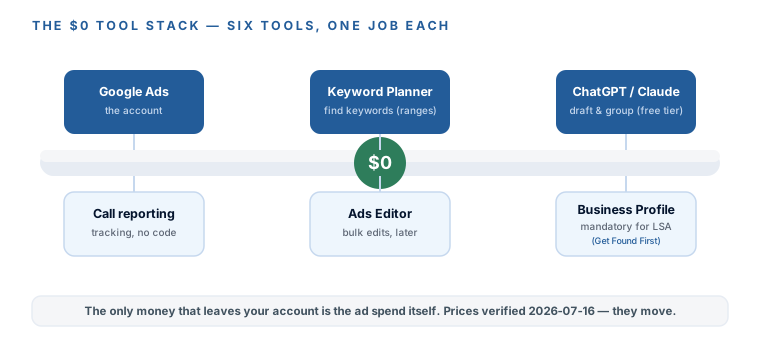
Six tools run everything in this course, and you pay for exactly none of them — the only money that leaves your account is the ad spend itself. Here’s each one and its single job (all prices and free tiers verified 2026-07-16; they move — check the vendor’s page):
- Google Ads — the account itself. Free to open and run; you pay only when someone clicks or, on LSA, when a real person contacts you.
- Google’s built-in call reporting — your conversion tracking. Free, no code, ten minutes to turn on. This is m6, and it’s the thing most owners skip and then wonder why they’re flying blind.
- Google Ads Editor — a free desktop app for bulk edits. There when you need it, not something you touch on day one; I’ll flag it honestly when it earns its place.
- Google Keyword Planner — free keyword discovery, built into the account. One honest catch: with little or no spend it shows search volumes as ranges like “1K–10K” rather than exact numbers. That’s completely fine for what we use it for — comparing relative size, not doing science. Practitioners say exact counts unlock once you have active spend, though Google publishes no threshold, so treat that as folklore, not fact.
- ChatGPT or Claude, free tier — drafts your ads, groups your keywords, generates your negative lists. This is the busywork that used to justify an agency retainer, now done in minutes for free. The free tiers have real message caps (they change constantly), so batch your prompts — do your ad drafting in one sitting rather than one question at a time.
- Your Google Business Profile — free, and as of 2026 it’s mandatory to run Local Services Ads at all. Building and optimizing it is Get Found First’s job, so we’ll credit it and point you there rather than re-teach it.
Google Ads
The account itself. Free to open; you pay only on a click or, on LSA, a real contact.
Call reporting
Google's built-in conversion tracking. Free, no code, ten minutes to turn on (m6).
Ads Editor
A free desktop app for bulk edits. There when you need it, not on day one.
Keyword Planner
Free keyword discovery, built in. Shows ranges on low-spend accounts — fine for comparing.
ChatGPT or Claude
Free tier drafts ads, groups keywords, builds negative lists — the old agency busywork.
Google Business Profile
Free, and mandatory to run LSA at all. Built in Get Found First.
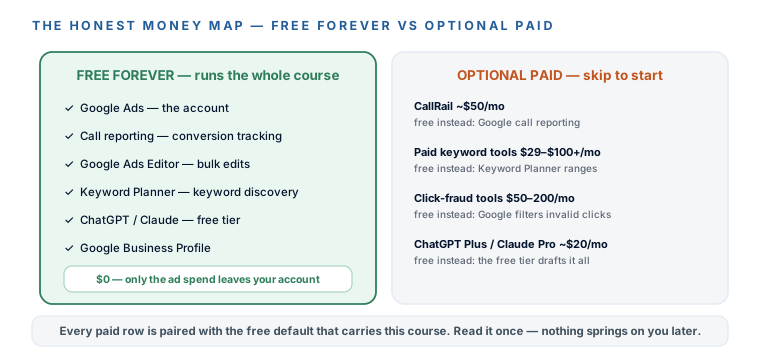
Where a dollar could enter — and the free alternative every time
So where could money sneak in? Four places, and every one has a free default that carries this course. I’m listing them now so nothing surprises you later — and in each case, the honest answer is “skip it, at least to start.”
- CallRail, about $50/mo — adds per-keyword call attribution and form tracking. The free default is Google’s own call reporting (m6), which is where everyone should start. Add CallRail later only if your site generates form leads you can’t otherwise track.
- Paid keyword tools — Keywords Everywhere credits, Ubersuggest at ~$29/mo, Semrush at $100+/mo. Skip them. Keyword Planner’s ranges carry everything this course needs.
- Click-fraud tools, $50–200/mo — skip these too. Google filters invalid clicks for free and doesn’t charge you for them, and the scary fraud statistics almost always come from the companies selling the protection. m7 covers this properly.
- ChatGPT Plus or Claude Pro, about $20/mo — nice to have if you use AI a lot, never required. The free tiers draft everything in this course.
Free forever — carries the course
- Google Ads account
- Google call reporting (tracking)
- Google Ads Editor
- Keyword Planner (ranges)
- ChatGPT / Claude free tier
- Google Business Profile
Optional paid — skip to start
- CallRail ~$50/mo → Google call reporting
- Paid keyword tools → Keyword Planner ranges
- Click-fraud tools $50–200/mo → Google's free filtering
- ChatGPT Plus / Claude Pro ~$20/mo → the free tier
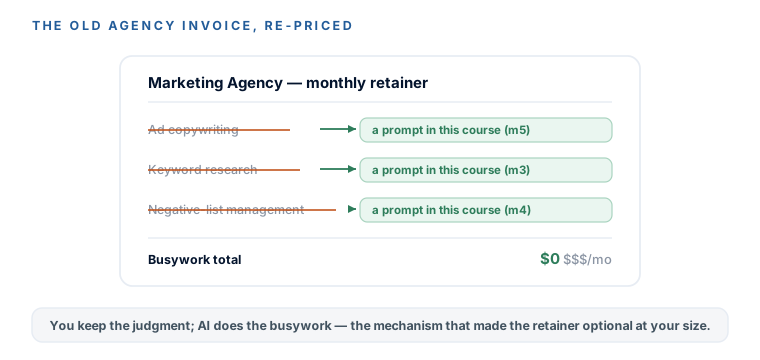
AI does the agency’s old busywork — for free
Here’s the shift worth sitting with, because it’s the reason a $1–3k firm can now sensibly run its own ads. Pull up an old agency invoice and you’ll see line items like “ad copywriting,” “keyword research,” and “negative-list management.” Those were real hours once. Now each one is a copy-paste prompt in this course — you supply the truth about your firm, AI does the drafting and sorting, and you keep the judgment. That’s not a gimmick; it’s the actual mechanism by which the agency retainer became optional at your size. If you want the deeper version of this — AI running more of your operation than just ads — that’s Automate Your Business with AI.
Everything above is verified 2026-07-16, and it will drift. Free tiers change, tools reprice, message caps move monthly. So here’s the habit I want you to keep every time you see a number printed in this course: prices and free tiers move — check the vendor’s page before you believe anyone, us included. An honest course tells you where to double-check it, not just what to believe.
You’re done tool-shopping. You know the whole stack — Google Ads, free call reporting, Ads Editor, Keyword Planner, ChatGPT or Claude on the free tier, and your Google Business Profile — and that the only money that leaves your account is the ad spend itself. You’ve seen the four places a dollar could enter (CallRail, paid keyword tools, click-fraud tools, and paid AI plans), and the free default that beats each one at your size. You understand the real shift underneath it all: the copywriting, keyword research, and negative-list work that used to justify an agency retainer are now copy-paste prompts, with you keeping the judgment. And you’ve got the standing habit-line for every price you’ll ever see — check the vendor’s page, because numbers move. Next module: the results page itself, decoded slot by slot, so the LSA-versus-Search decision has a real picture under it.