
Module 6 · Know what's working: tracking and the 15-minute read
Track calls the free way
You’ve built the whole machine — the plan, the LSA profile, the Search campaign, the ads, the pages. Session 3 is where you learn to read it. And it starts with the single most important switch in the entire account, the one most owners never flip: conversion tracking. Without it you’ll know exactly what you spent and have no idea what you bought. With it — and for a local firm this takes about ten minutes and zero code — every number in the rest of this course starts meaning something. This lesson turns on Google’s free call tracking. That’s the whole job.
No tracking means flying blind — and quitting the wrong campaign
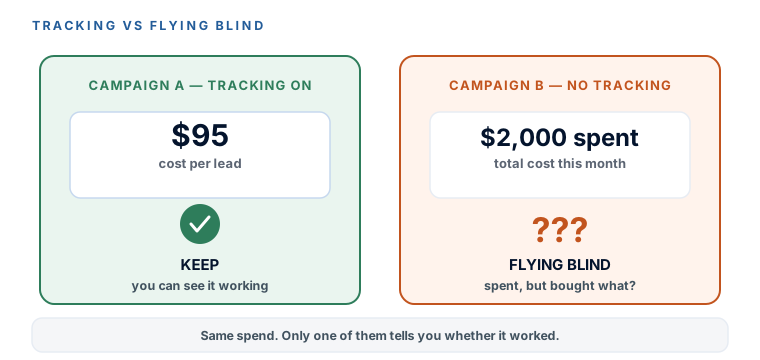
Here’s the failure this lesson exists to prevent. An owner runs ads for two months, watches $2,000 leave the card, feels nothing obvious happen, and shuts it off in frustration. The tragedy is that the campaign might have been working fine — leads were coming in, they just never got counted, so the owner couldn’t see them. The mirror-image tragedy is just as common: an account that isn’t working gets left running for a year because “we’re getting calls” — calls that were coming from your Google Business Profile anyway, not the ads you’re paying for. No conversion tracking is the number-one reason owners quit ads that were actually working and keep ads that weren’t. It’s the difference between running a business and running a slot machine.
For a local firm, the call is the conversion
You could spend a weekend learning Google Tag Manager, event snippets, and enhanced conversions. Skip it. For a law firm, a clinic, a trades business — the vast majority of your leads pick up the phone, and Google has a built-in way to count phone calls that needs no website code at all. It’s free, it’s the easiest tracking that exists, and it covers your actual reality. We do the harder form-tracking question next lesson, and only if your business genuinely needs it. Today: calls.
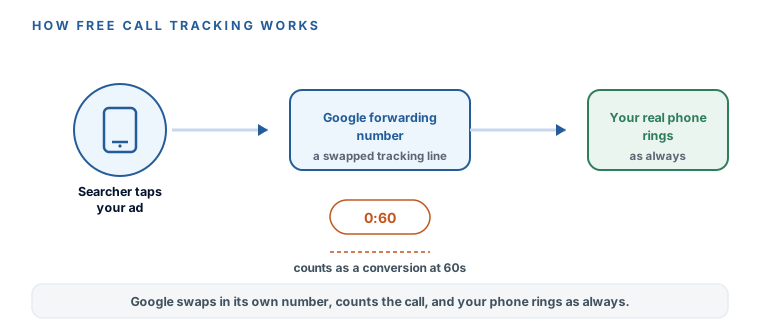
The mechanic is simple and worth understanding before you click anything, because it spooks people who don’t know what’s happening. When you turn on call reporting, Google quietly swaps a forwarding number into your ads in place of your real number. A searcher taps the ad, dials Google’s number, and Google instantly routes the call to your real phone — your line rings exactly as always, and the caller sees and hears nothing unusual. The only thing that changed is that Google now knows the call happened, how long it lasted, and can count it as a conversion once it passes a length you set.
Turn it on — the ten-minute setup
This mirrors the walkthrough video below. You’re creating one conversion action for calls from your ads, and setting the length that counts as a real lead.
- Goals → Conversions → New conversion action. In the left menu of Google Ads, open
Goals, thenConversions(sometimes labelledSummary), and click the button to create a new conversion action. - Choose “Phone calls.” Google offers a few conversion types — website, app, phone calls, import. Pick
Phone calls. - Choose “Calls from ads.” This is the free, no-code option — it counts calls made straight from your ads using Google’s forwarding number. (The other option, calls to a number on your website, needs a small snippet; the video covers it, and the next lesson handles anything site-side.)
- Set the minimum call length. This is the one real decision here. A call only counts as a conversion once it lasts at least this long. The decisive call: set it to 60 seconds. Long enough to filter out wrong numbers and ten-second hang-ups, short enough to catch a real “do you handle custody cases?” inquiry. You can tune it later against your own leads — but 60 seconds is the right place to start.
- Confirm call reporting is ON. Saving the action switches on call reporting for the account, which is what lets Google insert the forwarding number into your call assets. Check the toggle is on; that’s the piece that makes the counting work.
Some owners, especially in law, get uneasy about a “different” number showing on their ads. Don’t. It’s a standard, Google-run forwarding number used by millions of advertisers; the caller dials it, your phone rings, the conversation happens exactly as it would have. The only party who sees anything is you — in your reports, where the call now shows up as a counted lead. If it still bothers you, that’s a preference, not a problem.
What this does and doesn’t track — stated plainly
Honesty about the ceiling, so you’re never surprised. Call reporting counts calls made from your ads — a mobile searcher tapping the call button, or dialling the number that shows in the ad. Add the small website snippet (next lesson) and it also counts calls a visitor makes after clicking through to your site. What it does not do: tell you which specific keyword drove the call, or record the conversation. That’s CallRail territory — about $50/month, covered next lesson as the optional upgrade for firms that want per-keyword attribution. For now, the free version answers the question that actually matters: am I getting calls from these ads, and what do they cost me? That’s enough to run the account. (Prices move — check the vendor’s page before you rely on a number.)
Google’s free call tracking is live. You created a Phone calls → Calls from ads conversion action, set the minimum call length to 60 seconds, and confirmed call reporting is on — no code, no Tag Manager, about ten minutes. You understand the forwarding-number mechanic (Google’s number in the middle purely so the call can be counted; your phone rings as always) and you know the honest limit: this counts calls from ads, not per-keyword attribution or recordings. Most importantly, you’ve killed the flying-blind problem — from here on, every number in the account means something. Next: form tracking, for the firms that need it — and permission to skip it entirely if you don’t.
Watch this step
The exact free setup this lesson walks — a phone-call conversion action with a minimum call length, plus the website-call version — with no Google Tag Manager anywhere. Local-framed, ten minutes, no code. It’s from an independent creator — credited below, so go give them a follow.
Easily Track Phone Calls in Google Ads