
Start here
Welcome: why you can run this yourself

Hi, I’m Pete — welcome 👋
I built and sold a $3.7M firm, and I bought a lot of marketing on the way up — including Google Ads retainers that billed me a percentage of my own spend to do work you’re about to watch AI do in minutes. So I hear this one a lot, and it’s usually said with real feeling: “I tried Google Ads once and burned five grand for nothing.” I believe you, and it probably wasn’t your fault. Google Ads has a rotten reputation with small firms and honestly it’s earned: the platform’s defaults are built to spend your money fast, in the way that suits Google. It’s not a scam, it’s a business model — and there are a handful of switches that change the outcome.
This course is those switches, in order, with the math done honestly before you spend a dollar. It takes you from “ads are a money pit” to a working paid-capture engine on your own account: a Local Services Ads profile that charges you per lead, one tight Search campaign with every default trap disarmed, ads and a landing page drafted in your voice, and a 15-minute weekly read of the numbers. No agency, no marketing background, nothing technical — if you can describe your practice in plain English, you can run everything here. The person typing “your service near me” tonight already wants what you sell; that’s the cheapest trust you’ll ever borrow, if you show up properly. And one rule above all the rest: don’t buy the ring if you won’t answer the phone.
One thing worth knowing up front: I wrote the whole path — every lesson, worksheet, and copy-paste prompt. But for the click-by-click screen work — standing up your LSA profile, getting out of Google’s signup without a Smart campaign eating your budget, building the campaign itself — I’d rather show you than describe it, so I hand-picked the clearest video for those steps and dropped each one inside the lesson it belongs to, from module 2 onward. The framing, the math, and the judgment calls don’t need a video and don’t get one. Every video is by an independent creator and is credited with a link to their channel; go give them a follow.
Someone in your town is typing “[what you do] near me” right now, and Google is deciding whose phone rings. This course teaches you to be the answer — to capture that demand yourself, on your own account, without an agency and without a marketing background. It’s the lite version of the paid-acquisition work Evolvv runs for clients on retainer, handed to you in plain steps. This first lesson sets the frame the whole course rests on, tells you honestly who it’s for, and lays out exactly what you’ll walk away with.
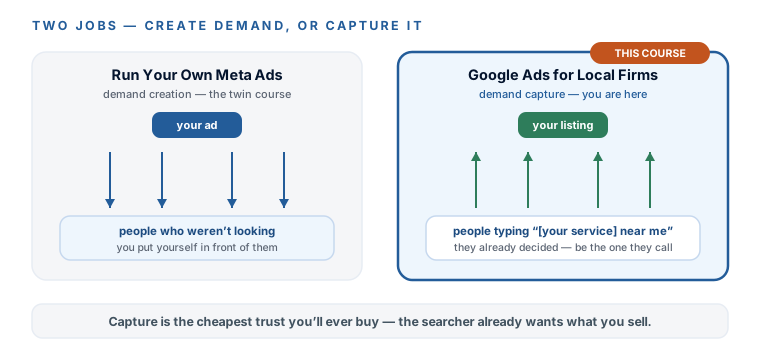
Meta creates demand. Google captures it.
Here’s the one idea that organizes everything else. There are two fundamentally different jobs in paid marketing, and confusing them is where most small-firm ad budgets go to die. Creating demand is putting your business in front of people who weren’t looking for it — a scroll-stopping ad in someone’s Instagram feed while they’re watching dog videos. That’s the job of Run Your Own Meta Ads, this course’s twin. Capturing demand is being there at the exact moment someone goes looking — when they open Google at 11pm and type “family lawyer near me” because something in their life just changed. That person doesn’t need convincing. They already decided they want a lawyer. Your only job is to show up, look credible, and answer the phone.
That’s why Google ads are the cheapest trust you’ll ever buy: you’re not persuading a stranger to want something, you’re raising your hand at the moment of need. It’s also why the reputation is so undeserved. The firms with the burned-five-grand story almost always fell into the same handful of default traps — the ones this course disarms one by one. Google’s defaults spend your money the way that’s best for Google, and you just need to know which switches to flip.
The honest gate: who this is really for
I’d rather lose you in the first ten minutes than waste your month. This course is built for an owner-led local firm — law firms first, but any local professional service works: accountants, clinics, financial advisors, trades. Three things have to be true, and if one of them isn’t, the honest move is to fix that first.
- You serve a defined area. A town, a metro, a commute radius. Google ads are a local game; if you sell nationwide online, this isn’t your channel.
- You can spend $1–3k a month without flinching. Real numbers, dated 2026-07, coming in the next lesson — but know now that in legal, $2–3k a month is the honest floor, and cheaper verticals can run on $1k. If the budget genuinely isn’t there, ads may not be your bottleneck at all; Evolvv’s Growth by Design helps you find the one that is.
- You will actually answer the phone. This is the one I’ll keep hammering. An ad buys the ring; it doesn’t answer it. If calls go to voicemail during business hours, you’re paying to send clients to your competitor’s answered line. Fix the answering first — that’s what Never Lose Another Lead is for — then come back and buy the traffic.
A defined service area
A town, a metro, a commute radius. Google ads are a local game — nationwide-online isn't this channel.
$1–3k a month, no flinch
Legal's honest floor is $2–3k; cheaper verticals run on $1k. If the budget isn't there, ads may not be your bottleneck.
A phone you'll answer
An ad buys the ring; it doesn't answer it. Calls to voicemail in business hours pay to feed your competitor.
I’m serious enough about this that it gets its own line in lesson one. Roughly a third of law-firm calls go unanswered (a vendor-run study — more on that with real numbers next lesson), and a lead you don’t answer in the first few minutes goes cold fast. Every dollar you’re about to spend is either wasted or multiplied by what happens when the phone rings. Keep that in the back of your mind through every lesson — it’s the difference between a money pit and a machine.
What you’ll actually walk away with
This isn’t a theory course. By the end you’ll own real, running machinery — and every piece of it, the account included, stays yours. Concretely:
- A live Local Services Ads profile with the Google Verified badge, priced per lead, with a lead-handling habit that protects your rank and your money.
- One tight Search campaign built the safe way — no Smart-campaign autopilot, phrase and exact keywords, a negative list, Presence location targeting, and a schedule that matches when you answer.
- Responsive search ads and a matching landing page, drafted by AI in your voice — the copywriting an agency used to bill you for.
- Free call-conversion tracking and a 15-minute weekly routine that tells you what a lead costs, what to cut, and when to scale.
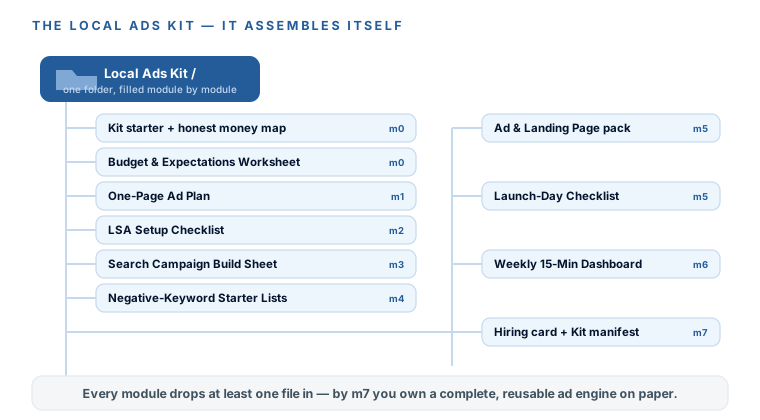
- The Local Ads Kit — every checklist, negative list, worksheet, and copy-paste prompt from the course, assembling itself in one folder as you go.
How this course works
Eight short modules — this one plus seven — in the order you’d actually do the work, with every step in one place instead of scattered across forum posts and half-current tutorials. The written lessons carry the spine; the hand-picked videos sit inside the lesson they belong to and handle the click-by-click screen work; and every module drops at least one real file into your Local Ads Kit:
- M1
How Google's paid surfaces work
The results page decoded slot by slot, then the LSA-versus-Search call for your firm, landed on a one-page plan. - M2
Local Services Ads: pay per lead, not per click
The safest first dollar in Google ads — the Google Verified badge, a lead price you can live with, and the habit that protects your rank. - M3
Your first Search campaign
Skip the Smart-campaign trap, pick keywords with real intent, and build one tight campaign. - M4
Stop the waste: negatives, location, schedule
Three hygiene moves that protect every dollar before you launch. - M5
Ads and landing pages that convert the click
AI drafts the ads and the landing copy in your voice, inside your profession's advertising rules — through launch day. - M6
Know what's working: tracking and the 15-minute read
Google's free call tracking, the five numbers that actually run a local account, and one weekly routine. - M7
Keep it running, scale it, or hand it off
The monthly scale, fix, and kill rules, an honest sort of Google's upsells, and when hiring help is genuinely fair.
Those seven modules group into three working sessions, which is how the road below is drawn. Session 1 (m1–m2) plans the thing and stands up the pay-per-lead machine. Session 2 (m3–m5) builds the Search campaign the safe way, through launch day. Session 3 (m6–m7) turns on the numbers and keeps it running.
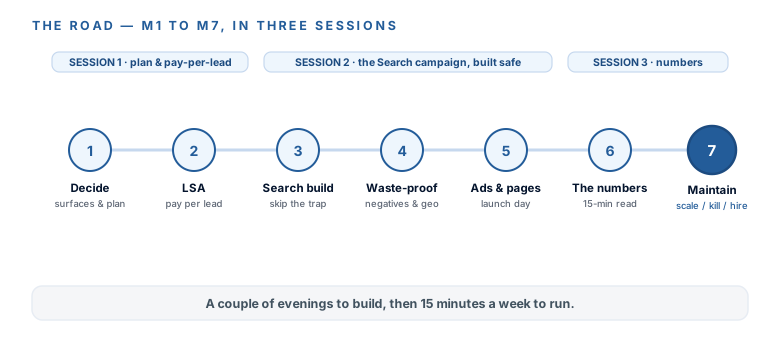
How long it takes: about six hours of reading across 29 short lessons, plus the videos and the real hands-on time in the account — most owners spread that over three sittings, a week or two apart. Then there’s a third kind of time you can’t rush: once the ads are live, the account needs to gather enough data to tell you anything. That’s why the worksheet in the next lesson ends with a line you sign yourself — I will not judge this for 60 days. Nothing here expires and nothing is timed, so you can come back to any lesson when it’s the one you need.
What it costs
The course is free — no gate, no upsell — and so is every tool it uses. The Google Ads account, Google’s built-in call reporting, Ads Editor, Keyword Planner, your Google Business Profile, and the free tier of ChatGPT or Claude cost nothing between them. The only money that leaves your account is the ad spend you choose, which is the number from the gate above: $1–3k a month, with $2–3k the honest floor in a competitive legal metro and $1k enough in cheaper verticals. Four paid tools will try to attach themselves to this work, and every one has a free default that carries the course: CallRail at about $50 a month (Google’s own call reporting does the job), paid keyword tools like Ubersuggest at about $29 or Semrush at $100 and up (Keyword Planner’s ranges are plenty), click-fraud tools at $50–200 a month (Google filters invalid clicks for free and doesn’t bill you for them), and a premium AI plan at about $20 a month (the free tier drafts everything here). The next two lessons put every one of those numbers in a dated table, and they all carry the same habit-line: prices and platform rules move — check the vendor’s page before you believe anyone, us included.
Everything you build here is what a percent-of-spend agency would charge to run at your size — and you’re about to see just how much of that monthly invoice was always automatable. Let’s start where every honest plan starts: with the money, on the table, before you spend a cent.
Google ads put you in front of someone at the exact moment they go looking. They can’t make a thin offer attractive, they can’t rescue a phone nobody answers, and no agency, vendor, or course — this one included — can promise you a cost per lead, a lead count, or a timeline. Anyone who does isn’t confident, they’re selling. What I can tell you is that your numbers will be your own, you’ll know them in about six weeks, and every figure in this course is a dated median or a range with its source named, so you can check it.
You’ve got the frame the whole course rests on: Meta creates demand, Google captures it — and you’re on the capture side, meeting people at the moment they go looking, which is why this is the cheapest trust you’ll ever buy. You know the honest gate: a defined service area, $1–3k a month you can spend without flinching, and a phone you’ll actually answer — and which sibling course fixes each one if it’s not true yet. You can see the road (three sessions, m1 to m7) and exactly what you’ll walk away with: a live LSA profile, one tight Search campaign, AI-drafted ads and pages, free tracking, a 15-minute weekly routine, and the Local Ads Kit. And you’ve met the one rule that outranks all the others — don’t buy the ring if you won’t answer the phone. Next: the whole arc as a map, and the honest money talk — every dollar, dated, before you spend one.
If you’d like to read more about my own background and experience, check out my about page.