
Module 5 · Ads and landing pages that convert the click
Make the phone ring: call assets and free ad real estate
For most local firms the goal isn’t a click — it’s a phone call. This lesson wires calling into your Search campaign the way Google actually supports today, then adds the other free assets a local Search ad should carry from day one. It starts by warning you off the advice you’ll see everywhere online, because half the internet is still teaching a tactic Google is in the middle of switching off.
First, the thing not to do: call-only ads
You’ll find countless guides pushing “call-only campaigns” for law firms. Ignore them. Call-only ads are being removed: you can no longer create new ones after February 2026, and existing ones stop serving in February 2027. Any guide teaching them is teaching you to move into a condemned building. (Dates verified 2026-07-16 — platform rules move, so check Google’s page.) The current, supported way to make the phone ring is the responsive search ad you just wrote, plus a call asset bolted onto it.
Call-only ads (the dead end)
- No new ones after February 2026
- Existing ones stop serving February 2027
- Half the internet still recommends them
- Teaching you to move into a condemned building
The current call play
- The responsive search ad you just wrote
- A call asset bolted onto it
- Google's free call reporting
- Supported today — not being switched off
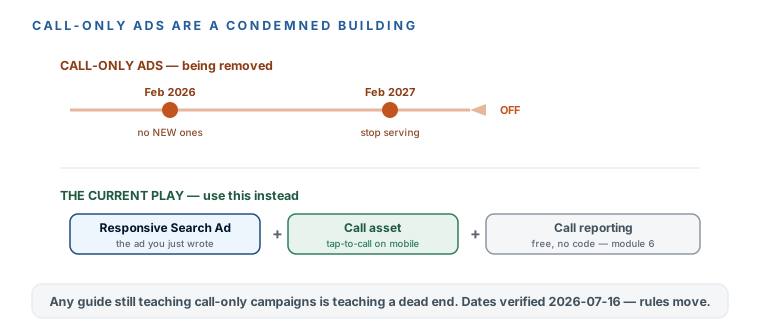
The current call play, in three pieces
- Add a call asset to your RSAs. Assets → Call → add your verified business number, and schedule it to the same answered hours as your ad schedule from last module. On mobile, a searcher can now tap to call you straight from the ad, without even clicking through.
- Turn call reporting on. Google swaps in a forwarding number and counts calls past a length you set as conversions — that’s how you’ll know the ads are producing calls, not just clicks. The full setup is its own lesson two modules from now; for now, just know it’s the second piece and it’s free and code-free.
- Answer the phone. The wiring is worthless if the call rings out. This is the same beat as the ad schedule, and it’s the whole point of the course — the ad buys the ring; whether it becomes a client is decided in the first five minutes. Never Lose Another Lead is the system that makes sure someone’s there.
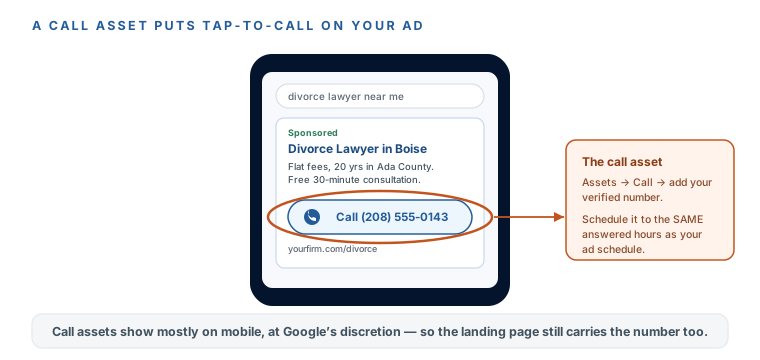
Call assets appear mostly on mobile and only when Google decides they fit — you can’t force them onto every impression. That’s exactly why the landing page you build next still has to carry your phone number, tap-able and prominent. Belt and suspenders: the call button when it shows, the page number when it doesn’t.
The other free assets — the rest of your ad’s real estate
Assets are the free square footage on your ad: Google hands that extra space to advertisers who fill it, and it costs you nothing but ten minutes. The call asset you just added is one of them. Three more belong on a local Search ad from day one, and every one of them widens the ad and lifts your click-through rate for zero extra spend — Google nags you to add them from the moment you launch, and here it’s actually right.
- Sitelinks — two to four links to real pages: the sections of your service page, your contact page, your about page. They give the searcher more ways in and make your ad taller than a competitor’s bare text ad.
- Callouts — short, unlinked proof snippets: “Flat fees,” “Free 30-minute consult,” “Evening appointments.” Same rule as your headlines — only what you can prove, and the state-bar red lines from the last lesson apply here exactly as they do to the ad.
- Location asset — links your Google Business Profile so the ad can show your address and a map pin. It’s the natural payoff of the verified-GBP requirement you already met for Local Services Ads back in module 2.
Call asset
A tap-to-call button on mobile, scheduled to the hours you answer.
Sitelinks
2–4 links to real pages — a taller ad and more ways in, free.
Callouts + location
Provable proof snippets, plus your address and map pin from your GBP.
You won’t control exactly which assets show on any given impression — Google assembles the ad per search. But the rule is simple: fill every relevant slot, keep every line provable, and let Google use the space. An empty ad is a smaller ad, and a smaller ad loses the click to the firm that filled theirs.
You’ve wired calls in the current, correct way — a call asset on your RSAs, scheduled to the hours you answer, with call reporting flagged to switch on when you build tracking. And you know why the internet’s favorite “call-only campaign” advice is a dead end: those ads are being switched off (no new ones after Feb 2026, gone by Feb 2027). You’ve also filled the rest of your ad’s free real estate — sitelinks, callouts, and the location asset — which widen the ad and lift CTR for nothing. You know call assets show at Google’s discretion, so the page still has to carry the number — which is next. And the standing reminder holds: the ad buys the ring; answering it is where the money is actually made.
More learning resources
Still want another angle? These are hand-picked and vetted to line up with this lesson — from creators and sites worth your time.