
Module 4 · Stop the waste: negatives, location, schedule
The negative-keyword starter list
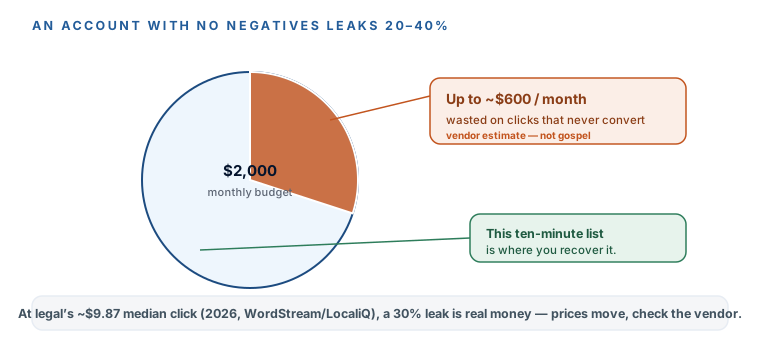
Here’s the cheapest money you’ll ever save in Google Ads, and almost nobody spends ten minutes on it. Vendor analysis of law-firm accounts — flagged as vendor analysis, because the people who publish it also sell the fix — puts wasted spend at 20–40% of budget on clicks that were never going to become a client. At legal’s median $9.87 a click (2026 medians, WordStream/LocaliQ — a large-sample vendor study, and prices move, so check the vendor’s page), a 30% leak on a $2,000 budget is $600 a month buying nothing. This lesson plugs it before you ever go live, with a themed negative-keyword list that AI drafts for you in minutes.
What a negative keyword actually is
A regular keyword tells Google show my ad when someone searches this. A negative keyword does the opposite: it says if this word is in the search, sit my ad out.It’s the bouncer at the door. Someone searches “divorce lawyer near me” and your ad walks in. Someone searches “free divorce lawyer” or “divorce lawyer salary” or “how to file for divorce yourself” — and the bouncer turns them away before you pay a cent. Every one of those turned-away clicks is a full-price click you didn’t buy, and at $10 a pop they add up fast.
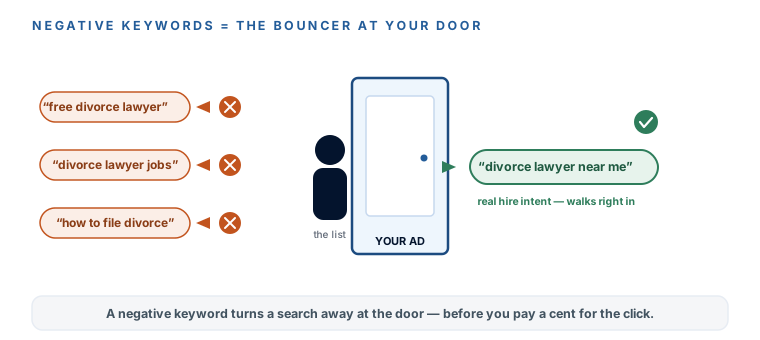
This is the through-line of the whole course in one setting: Google’s defaults are built for Google, not for you. A fresh campaign has zero negatives, so it will happily spend your budget on job-seekers, students, and people hunting for a free template. Not a conspiracy — a business model. You just flip the switch it hoped you’d miss.
The starter list, by theme — because flat lists rot
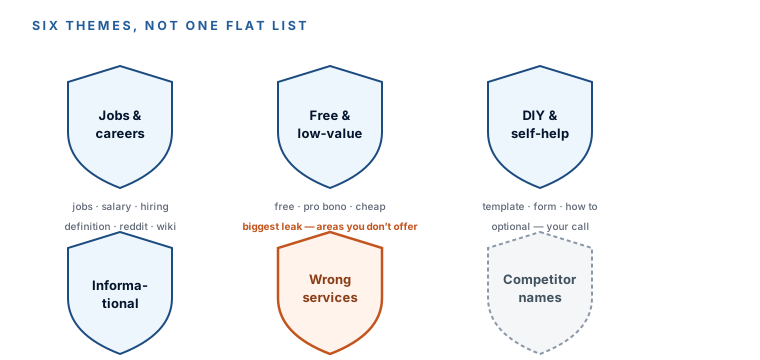
Don’t build one giant alphabetical dump of words; build themed buckets. Themes scale — when you spot a new junk pattern next month you know exactly which bucket it belongs in — and they make it obvious what you’re actually blocking. Here are the six that cover almost everything a local firm needs:
- Jobs & careers. People looking for work, not services: jobs, salary, hiring, paralegal, internship, resume, “law school.”
- Free & low-value. People who won’t pay: free, pro bono, legal aid, cheap, lowest, discount.
- DIY & self-help. People avoiding hiring anyone: DIY, template, form, sample, “how to,” kit.
- Informational. Researchers, not buyers: definition, “what is,” reddit, quora, wiki, forum.
- Wrong services. Every practice area or service you don’t offer — this is the biggest custom section, and the biggest source of waste. A family lawyer blocking criminal, DUI, bankruptcy, personal injury keeps their budget on family law.
- Competitor names (optional). Bidding on a rival’s name as a keyword is legal, but it’s often junk traffic at this budget — your call, and we revisit it in the final module. (Never put a competitor’s name in your ad text, though; that’s a different, riskier game.)
Jobs & careers
People looking for work, not services: jobs, salary, hiring, paralegal, internship, resume.
Free & low-value
People who won't pay: free, pro bono, legal aid, cheap, lowest, discount.
DIY & self-help
People avoiding hiring anyone: DIY, template, form, sample, “how to,” kit.
Informational
Researchers, not buyers: definition, “what is,” reddit, quora, wiki, forum.
Wrong services
Every practice area you don't offer — the biggest custom section and the biggest leak.
Competitor names
Optional. Often junk traffic at this budget — your call, revisited in the final module.
Let AI do the agency’s old busywork
Building a personalized negative list used to be a line item on an agency invoice — “negative keyword list management,” billed monthly. Now it’s one prompt. Paste your service and the practice areas you don’t offer, and a free-tier ChatGPT or Claude session hands back a themed, paste-ready column in a couple of minutes. This is the pattern the whole Automate Your Business with AI course generalizes: AI doing the recurring ops work you used to pay someone else to do.
Negative-keyword list generator — paste your details, get a paste-ready list
Build me a negative-keyword list for my Google Ads campaign — the searches I NEVER want to pay
for a click on.
- My business: [WHAT YOU DO] in [TOWN].
- The ONE service my campaign advertises: [SERVICE].
- Services/practice areas I do NOT offer: [LIST — be exhaustive; this is the biggest waste source]
- Do I want to block searches for my competitors' names? [YES/NO — if yes, list them]

Generate negatives grouped under these themes, 10–25 words per theme where they genuinely apply:
1. Jobs & careers (people looking for work, not services)
2. Free & low-value (free, pro bono, cheap — people who won't pay)
3. DIY & self-help (templates, forms, "how to" — people avoiding hiring)
4. Informational (definitions, research, forums)
5. Wrong services (from my do-NOT-offer list — every phrasing a searcher would actually use)
6. Anything specific to my profession I haven't thought of.
Give me the final list as one plain column, lowercase, one term per line, so I can paste it
straight into a Google Ads negative keyword list. No duplicates.
Read the output before you trust it — AI drafts, you own the send here too. Skim for anything that would block a real client (a family lawyer shouldn’t blanket-block “custody” just because a variant looked odd), delete those, and keep the rest.
Where the list lives: account-level, so every campaign inherits it
Don’t paste negatives into a single campaign. Build a shared, account-level negative keyword list once, and attach it — then every campaign you ever run inherits the same protection, and your weekly Search Terms triage (next lesson) drops new junk into one place instead of five. The path:
- Tools → Shared library → Negative keyword lists → create a new list, name it something like “Master negatives.”
- Paste your themed column from the prompt — one term per line — and save the list.
- Apply it to your campaign. From the list, choose “Apply to campaigns” and tick the Search campaign you built last module. Done — it’s now blocking everywhere it’s attached.
Negative keywords are a touch stricter than regular ones — a negative phrase won’t block close variants, misspellings, or plurals the way you might expect. So block both “free” and the obvious variants that matter, and lean on the weekly Search Terms report to catch what slips through. You’re not aiming for a perfect wall on day one; you’re aiming for a good wall that you patch every week.
One important exception: if you advertise a free consultation, don’t block bare “free.” People searching “free consultation with a family lawyer” are ready to hire — that’s exactly who you want. Block the wasteful “free” patterns instead (“free forms,” “free template,” “free legal aid”), and let the free-consult searches through.
You’ve installed the single highest-leverage waste control you fully own — a themed, account-level negative keyword list — before spending a dollar. You know a negative is the bouncer that turns junk searches away at the door, you know the six themes (jobs, free, DIY, informational, wrong-services, and optional competitors), and you let AI draft the personalized list instead of paying an agency to “manage” it. You built it as a shared list so every campaign inherits it, and you grabbed the four-vertical starter pack from the Kit. The 20–40% leak — a vendor estimate, but a costly one — is now mostly plugged. Next: the Search Terms report, where you find the junk your starter list didn’t predict and add it in ten minutes a week.