
Module 5 · Ads and landing pages that convert the click
Launch day: the pre-flight checklist
Everything you’ve built across the last four modules has been sitting paused, on purpose. This lesson is the pre-flight run-up: one consolidated checklist across the account, the campaign, the ad groups, the ads and pages, and tracking — then you unpause, and you learn exactly what the first two weeks will and won’t tell you. It’s a short lesson. It’s also the one that stops a silly, expensive miss on launch day.
The pre-flight checklist
Run this top to bottom before you flip the switch. Each item is something you set in an earlier lesson — this is the confirmation pass, grouped by panel like a cockpit run-up card.
- Account — billing verified; advertiser identity verification done or watched-for; auto-apply recommendations OFF.
- Campaign — Search only, Search Partners and Display off; location set to Presence; ad schedule set to answered hours; daily budget = monthly ÷ 30.4; manual CPC caps set.
- Ad groups — two or three tight themes; phrase and exact only, no broad; the account-level negative keyword list attached.
- Ads & pages — one compliant RSA per group; call asset scheduled; every final URL is a matching landing page, not the homepage; every claim provable (the state-bar pass).
- Tracking — call reporting ON (you finish this properly next module — launch and build tracking the same week, because data before tracking is just noise you paid for).
- LSA — if you’re running it: profile verified or in progress, and the “rate every lead” habit installed.
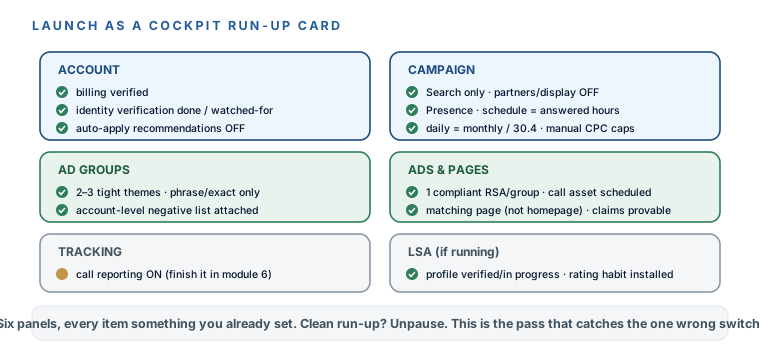
Checklist clean? Unpause the campaign. It’s live.
What the first two weeks actually look like
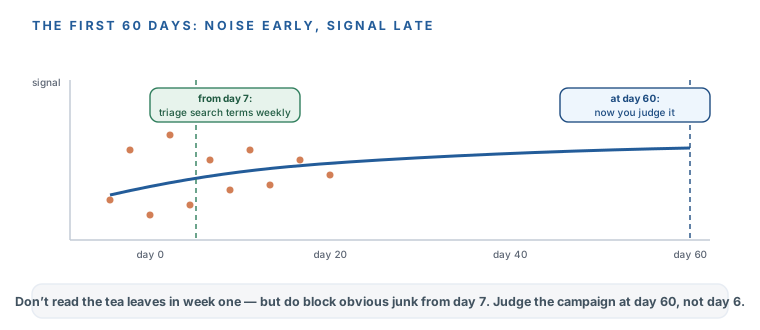
Set your expectations now, because the opening fortnight is genuinely misleading. Impressions trickle in. Clicks are lumpy — three one day, zero the next. There’s a real learning period while Google figures out who to show you to. Per the one-page plan you made in module 1, you don’t judge anything for 60 days — the numbers don’t mean much until they’ve had time to settle, and Local Services Ads verification alone can eat three or four weeks of that window.
Your daily budget is an average, not a hard ceiling on any single day. Google can spend up to roughly twice your daily number on a busy day — then less on a slow one — while the month stays capped at about daily × 30.4. So a $65/day budget that shows $120 spent yesterday isn’t a billing error; it’s Google borrowing from a quiet day to catch a busy one, and it evens out by month’s end. It’s the same idea as the LSA weekly cap back in module 2 — know it now so the first over-budget day doesn’t trigger the exact week-one panic the 60-day rule exists to prevent. (Verified 2026-07 against Google’s “average daily budgets” help page — platform rules move, so check it.)
The one thing you do start immediately: from about day seven, run the Search Terms triage from last module every week. Junk searches show up right away, even before real signal does — so you block the obvious waste from week one while you patiently wait out the learning period on everything else.
The moment you’re live, Google’s interface begins suggesting: “your campaign is limited by budget,” “switch to broad match,” “try Performance Max,” “raise your bids.” Some of it is real; most of it spends your money faster. You already turned auto-apply off, so nothing changes without you. The final module teaches you to sort the genuine advice from the upsell — until then, when in doubt, dismiss and hold.
You ran the full pre-flight — account, campaign, ad groups, ads and pages, tracking, and LSA — caught anything left in the wrong position, and unpaused a live campaign built the safe way from end to end. You know the first two weeks are deliberately misleading: trickling impressions, lumpy clicks, a real learning period, and no verdict for 60 days — but the Search Terms triage starts weekly from day seven because junk arrives before signal. And you know Google will nag from minute one, that auto-apply is already off, and that the last module sorts the real advice from the upsell. Your ad engine is running. Next module: turning on the free tracking that makes every number mean something, and the 15-minute weekly read that keeps the whole thing honest.