
Module 3 · Your first Search campaign
Match types: why you start phrase and exact
Match types decide how loosely Google interprets your keywords — how far it’s allowed to wander from what you typed when it goes looking for searches to show your ad on. There are three, they behave much looser in 2026 than their old names suggest, and getting this one setting right is the difference between a budget that works and a budget that evaporates on searches you never meant to buy. The rule is short: day one, you use phrase and exact only. Here’s why that’s reasoning, not superstition.
The three match types, in current truth
Translated from Google’s own wording into plain English:
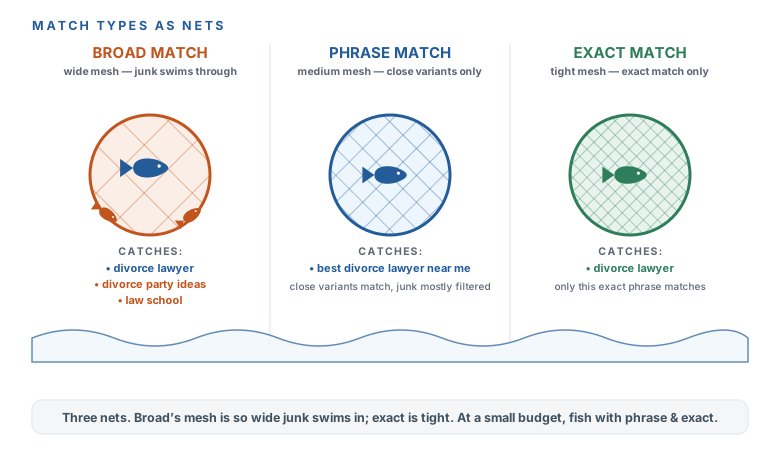
- Broad match shows your ad on searches Google decides are “related to” your keyword — explicitly including searches that don’t contain its meaning. Google itself says it’s critical to pair broad match with Smart Bidding, which tells you something: broad needs a machine watching it. And here’s the trap — broad is the default when you paste in bare keywords. Type “divorce lawyer” with no punctuation and Google treats it as broad, and your budget starts spending on things “related to” divorce lawyers, whatever Google decides that means.
- Phrase match shows your ad on searches that include the meaning of your keyword — and the meaning can be implied, not just the literal words. It absorbed what used to be called “modified broad,” so it’s wider than it once was, but still anchored to your intent. You write it with quotation marks: “divorce lawyer”.
- Exact match shows your ad on searches with the same meaning or intent as your keyword — the tightest, lowest-waste option. You write it with square brackets: [divorce lawyer].
Broad — widest, riskiest
Shows on searches Google decides are “related to” yours, even ones that don't contain its meaning. The sneaky default for bare keywords.
Phrase — “quotation marks”
Shows on searches that include your keyword's meaning, implied or literal. Wider than it used to be, but anchored to your intent.
Exact — [square brackets]
Shows on searches with the same meaning or intent — the tightest, lowest-waste option. Your day-one workhorse.
Why phrase and exact, and why not broad — yet
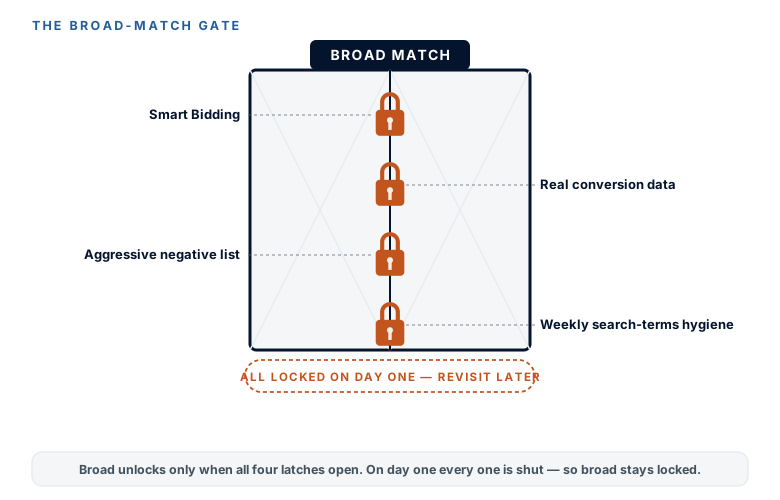
The decisive rule, stated flat: your first campaign uses phrase and exact only. Broad match isn’t evil — it’s just only safe when you have three things a day-one account doesn’t: Smart Bidding with real conversion data feeding it, an aggressive negative-keyword list catching the junk, and a weekly habit of reading the Search Terms report to see where it wandered. Give broad match to an account missing those three and it does exactly what its own description promises — spends your budget on searches “related to” yours until there’s nothing left, with no machine and no negatives to rein it in.
So broad stays locked on day one. A later module revisits it as a deliberate experiment once you’ve built the three things that make it safe. Until then, phrase and exact are how a small budget stays pointed at people who actually want to hire you.
Type them right — and know your net still has give
The mechanics are just punctuation. Wrap a keyword in quotation marks for phrase — “divorce lawyer” — and in square brackets for exact — [divorce lawyer]. Bare text with no punctuation is broad, which is the trap, so every keyword on your build sheet gets one or the other. Take a second now and add the quotes and brackets to the keywords the grouping prompt gave you last lesson.
Google loosened exact match years ago, so even your tightest net has some give — “same intent” means Google will still show your ad on close variants and rephrasings, not only the exact string. That’s not a reason to distrust it; it’s the reason the Search Terms report (the next module) is a weekly habit and not a nice-to-have. No match type is a perfect filter, so you check what actually came through and block what shouldn’t have.
You understand what the three match types actually do in 2026 — broad wanders onto searches that don’t even contain your meaning (and is the sneaky default for bare keywords), phrase matches your keyword’s meaning, exact matches its intent and wastes the least. You’ve committed to phrase and exact only on day one, and you know why: broad is only safe with Smart Bidding, conversion data, an aggressive negative list, and weekly hygiene — four things your new account doesn’t have yet. You’ve added the quotes and brackets to your build-sheet keywords, and you know even exact match has some give, which is what makes the Search Terms report a weekly job. Next: build the campaign, ad group by ad group.
More learning resources
Still want another angle? These are hand-picked and vetted to line up with this lesson — from creators and sites worth your time.