
Module 3 · Your first Search campaign
Open the account (and dodge the Smart-campaign trap)
Local Services Ads capture the head of the demand — the people typing exactly what you do. A Search campaign captures everything LSA can’t reach: specific sub-services, neighboring towns, the searches where you want to control the exact message. But before you build one, you have to open a Google Ads account — and Google’s signup is quietly engineered to have a beginner spending money on autopilot within one sitting. This lesson gets you to a real, bare account with billing set and no campaign running, and shows you the escape hatch Google hopes you don’t notice.
Name the trap before you walk into it
Google’s guided signup wants to funnel you straight into a “Smart” campaign — an automated campaign with vague targeting, no keyword control, and no visibility into what searches actually triggered your ads. It’s built to get your card charged in one sitting. That’s great for Google and expensive for you. This isn’t a conspiracy; it’s a business model. The defaults are designed to spend your money fast, and your whole job on day one is to know which switches to flip.
The move is simple once you know it’s there: skip campaign creation entirely. When the wizard pushes you to make a campaign, look for the “skip campaign creation” link — or, in some versions of the flow, start a throwaway campaign and immediately choose “leave campaign creation.” Either way you land in a bare, real account with no autopilot spending your budget. The walkthrough video for this lesson shows the exact current click-path, because Google moves this link around.
The Smart campaign (the trap)
- Automated, vague targeting
- No keyword control
- No visibility into what triggered your ads
- Built to charge your card in one sitting
The bare account (the goal)
- Skip campaign creation entirely
- No autopilot spending your budget
- Every setting is yours to choose
- Real account, billing set, zero spend
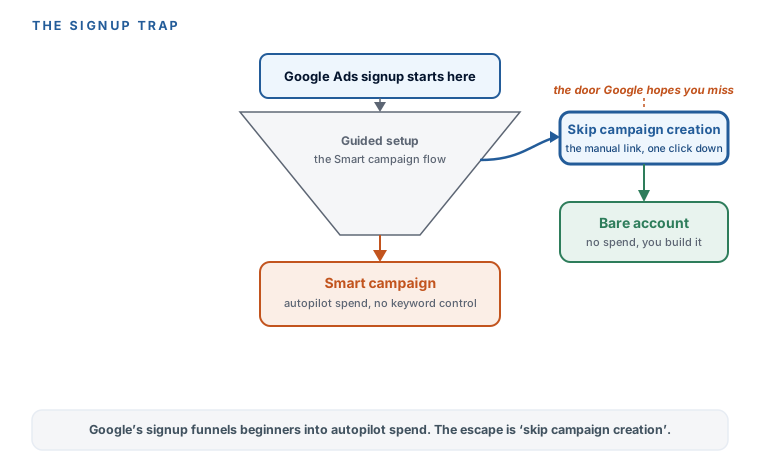
Build the account, dodge the campaign
Here’s the whole day-one sequence. It ends with a real account and zero dollars spent.
- Go to ads.google.com and sign in. Use a Google account you control and will keep — this becomes the owner of everything.
- Skip campaign creation. When the wizard pushes you to build a campaign, take the “skip campaign creation” / “leave campaign creation” escape. Do not build a Smart campaign because the flow makes it feel required. It isn’t.
- Confirm your business info. Straightforward — name, country, and the basics.
- Set up billing. Add your card and verify it. You’re not spending anything yet; you’re just making the account real so it’s ready when your campaign launches (in module 5, not before).
- Land in the bare account. You should now be looking at a real Google Ads account with no campaign, no spend, and full control. That’s the goal state for this lesson.
Two five-minute switches while you’re in there
While you have the account open, flip two settings that save you grief later.
- Sanity-check your time zone and currency. These are set once and can’t be changed later without opening a new account. Thirty seconds now saves a real headache.
- Turn OFF auto-apply recommendations. Under Settings → Recommendations, Google’s “auto-apply” will happily make “improvements” to your account on its own — the same autopilot trap wearing a different hat, spending on things you didn’t choose. Switch it off. A later module teaches you which of Google’s nags are actually worth acting on; until then, you decide, not the robot.
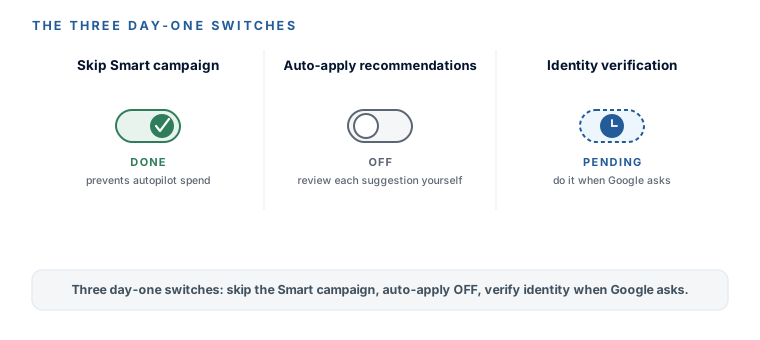
At some point Google will email you to verify your identity as an advertiser: business registration documents plus a government photo ID of an authorized representative. This is real, it’s mandatory, and it’s rolling out to everyone — not a scam, not optional. Your ads can be restricted or paused until you complete it, and once you do, your verified business name appears publicly in Google’s Ads Transparency Center. Do it promptly when the email arrives, and give accurate information — false info leads to suspension. (Third-party guides mention a roughly 30-day window; treat that as a “do it soon” nudge rather than an exact Google-stated deadline.)
Google’s onboarding often dangles a “spend $500, get $500” type credit, and the exact terms change constantly. They almost always require you to spend a set amount first, within a window, before the credit lands. It can be genuinely worth taking — just read the spend requirement before you count the money, so you’re not surprised by what you had to lay out to earn it.
You have a real, bare Google Ads account — billing set, verified, and no campaign spending a cent. You dodged the Smart-campaign trap by skipping campaign creation, you set your time zone and currency (the ones you can’t change later), and you turned auto-apply recommendations OFF so Google isn’t “improving” your account behind your back. You know advertiser identity verification is coming and that you complete it promptly when asked, and you know to read the fine print on any onboarding credit. The foundation is poured. Next: keywords — finding the exact words worth paying for, free, and grouping them tight.
Watch this step
The exact escape this lesson turns on — the modern signup flow, click "skip," then "leave campaign creation," finish billing, and land in a real account with no Smart campaign spending your money. Reputable, current, non-technical. It’s from an independent creator — credited below, so go give them a follow.
How to Set Up a Google Ads Account in 2026
More learning resources
Still want another angle? These are hand-picked and vetted to line up with this lesson — from creators and sites worth your time.