
Module 4 · Stop the waste: negatives, location, schedule
The Search Terms report: your weekly goldmine
The last lesson blocked the junk you could predict. This one shows you the junk you couldn’t — the searches real people actually typed to trigger your ad, which are almost never exactly the keywords you chose. It’s the closest thing to mind-reading Google gives you, most owners never open it, and agencies charge a monthly fee to act on something that takes ten minutes a week. This is the cheapest optimization in all of Google Ads. Learn to read it once and you own it forever.
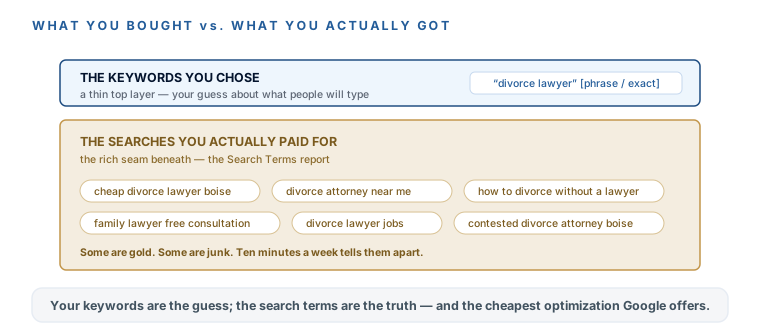
Keywords are what you bought; search terms are what you got
Your keywords are a guess about what people will type. Even on phrase and exact match — which, remember, are looser than their names sound in 2026 — the actual searches that trigger your ad drift from your keywords. The Search Terms report is the ledger of what really happened: the exact words searchers used, with the clicks and cost each one rang up, attached. That gap between “what I thought I bought” and “what I actually bought” is where your money quietly leaks — and where your next great keyword is hiding.
The 10-minute weekly triage
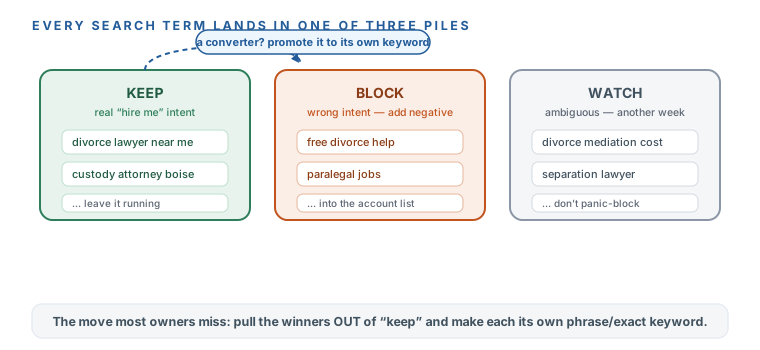
Open the report and sort by cost, so the terms eating the most budget rise to the top. Then walk down the list and make one of three calls on each term — keep, block, or watch:
- Open the report. Campaigns → Insights and reports → Search terms. Sort the table by Cost, highest first — you’re triaging where the money is going, not reading alphabetically.
- KEEP the good ones. Real hire-intent (“divorce lawyer near me,” “child custody attorney [town]”) — leave it running. And if a term is converting but isn’t one of your keywords yet, add it as a phrase/exact keyword of its own so you can control its bid and ad.
- BLOCK the junk. Irrelevant, informational, DIY, jobs, wrong-service, or wrong-location terms — click to add each as a negative, and choose your account-level list from last lesson so it’s blocked everywhere, forever, not just here.
- WATCH the gray ones. Plausible but off-center — give it another week of data before you decide. Don’t panic-block a term that might be a real client; note it and move on.
KEEP
- Real hire-intent — leave it running
- Converting but not yet a keyword? Promote it to phrase/exact
- Now you control its bid and ad
BLOCK
- Irrelevant, informational, DIY, jobs
- Wrong-service or wrong-location terms
- Add to your account-level list — blocked everywhere, forever
WATCH
- Plausible but off-center
- Give it another week of data
- Don't panic-block a possible real client
Let AI pre-sort the piles
You can do the triage by hand — and once you’ve got the rhythm, it’s quick. But when the list is long, paste the week’s terms into this prompt and let AI pre-sort them into the three piles with a one-phrase reason each. You approve the calls; you don’t analyze from scratch. The negatives come back paste-ready.
Search-terms triage — paste this week's terms, get three sorted piles
Triage my Google Ads search terms like a waste-averse ads manager. My money is on the line.
- My business: [WHAT YOU DO] in [TOWN].
- My campaign advertises: [SERVICE].
- This week's search terms (term, clicks, cost — pasted from the Search Terms report):
[PASTE]

Sort every term into exactly three piles:
1. KEEP — real "hire me" intent. Flag any that performed well and should be added as a
   phrase/exact keyword of its own.
2. BLOCK — wrong intent (free, DIY, jobs, research, services I don't offer, wrong location).
   Give me the exact negative keyword to add for each, one per line, ready to paste.
3. WATCH — ambiguous; tell me in one phrase what would move each to keep or block.
Be decisive. When in doubt between keep and watch, choose watch; between watch and block at
legal-level click prices, choose block.
Make it a standing habit, not a one-time cleanup
The Search Terms report isn’t a launch-day chore you finish once. It’s a weekly block — the single most valuable five minutes in the 15-minute routine you’ll build two modules from now. Junk shows up immediately, even before your real signal does, so you start triaging from about day seven whether or not the campaign has “proven” anything yet. Block a little every week and the account gets cleaner as it ages instead of dirtier.
Google hides some low-volume and privacy-sensitive search terms, so the report shows you most of your spend but never every last query. That’s not a bug you can fix — it’s another reason the phrase/exact discipline and the negative list from last lesson matter: they keep the searches you can’t see from drifting too far off-target in the first place.
You can open the Search Terms report, sort it by cost, and run the three-pile triage — keep the real hire-intent (and promote converters to their own keyword), block the junk into your account-level negative list, and watch the gray ones a week longer. You know the report is the gap between the keywords you chose and the searches you actually paid for — the cheapest optimization in Google Ads, and the one owners skip. You’ve got the AI triage prompt for the long weeks, and you know this is a standing weekly habit that starts around day seven, not a one-time cleanup. You also know you’ll never see 100% of your terms, and why that’s fine. Next: the two location and schedule settings that stop your ads showing to the wrong people at the wrong hours.
Watch this step
The Insights-and-Reports → Search-terms click-path with live triage — the cheapest optimization in all of Google Ads, shown end to end. (Recorded early 2025; the report has barely moved, but the exact menu labels may look slightly newer in your account.) It’s from an independent creator — credited below, so go give them a follow.
The RIGHT WAY To Find & Add Negative Keywords (Google Ads)
More learning resources
Still want another angle? These are hand-picked and vetted to line up with this lesson — from creators and sites worth your time.