
Module 6 · Know what's working: tracking and the 15-minute read
Track form fills without becoming a developer
Start with a decision that might save you an hour of frustration: if roughly nine out of ten of your leads call you, skip this lesson. Call tracking from the last lesson already covers your reality — come back here the day forms actually start mattering. This lesson is for the firms where people fill in a contact form as often as they dial, and it lays out the honest tiers so nobody ends up grinding on Google Tag Manager at midnight to track a contact form. There’s a simple free path, a paid shortcut, and a “call a developer once” option — and a clear rule for which one is yours.
The simple free path: a thank-you page and one tag
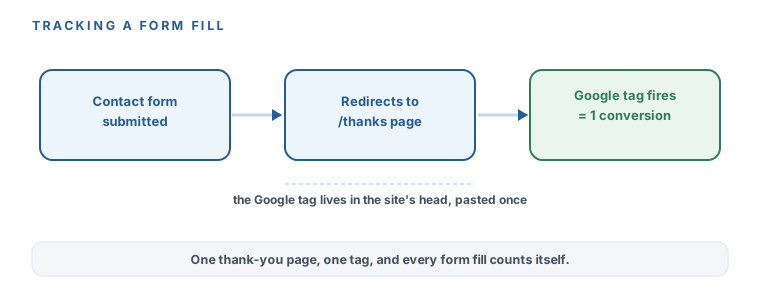
Form tracking sounds technical, and the internet makes it sound worse than it is. The free method is three moving parts, and you only wire them once:
- A thank-you page. Your contact form, after someone submits it, sends them to a dedicated page — something like
/thanks. That redirect is the whole trick: landing on that page is the signal that a form was filled. - The Google tag, pasted once. Google Ads gives you a small snippet — the
Google tag— that goes into your site’s<head>, once, site-wide. Most website builders have a clearly labelled box for exactly this. - A conversion action that fires on the thank-you URL. In Google Ads you create a website conversion action set to count a visit to
/thanks. Now every form fill counts itself, automatically.
The one genuinely fiddly part — where exactly the tag goes for your website — isn’t something you should have to intuit. If you built your site in the Evolvv website course, the Edit & Update Your Website with AI course owns the paste mechanics. Otherwise, the prompt below tells you precisely where the box lives for your platform. Don’t learn Google Tag Manager for this. Nobody running $2,000 a month of ads should have to.
Copy this prompt — tag installation helper
Help me install my Google Ads conversion tag without a developer.
- My website is built with: [e.g. "WordPress with Elementor" / "Squarespace" / "the Next.js
  site from Evolvv's website course" / "I don't know — here's my site: URL"]
- Google Ads gave me a "Google tag" snippet and a conversion that should fire when someone
  lands on my thank-you page: [THANK-YOU PAGE URL]

1. Tell me, for MY platform, exactly where to paste the Google tag (menu names, step by step).
2. Tell me how to make my contact form redirect to the thank-you page if it doesn't already.
3. Give me a 2-minute test plan to prove it works (and remind me to delete the test lead).
If my platform makes this genuinely hard, say so and tell me whether a one-time freelancer
task or CallRail (~$50/mo) is the saner path. Plain steps, no jargon.
The three tiers, honest and priced
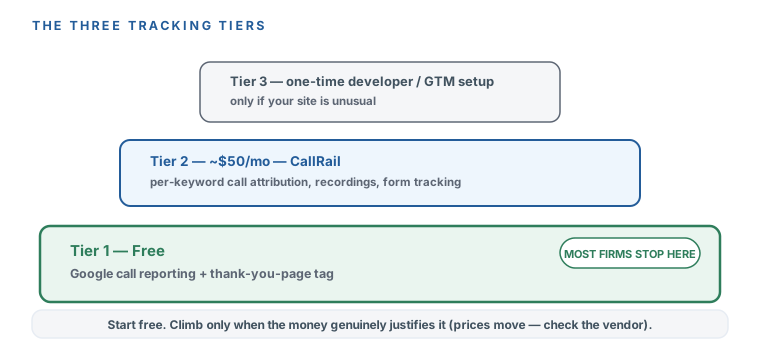
Here’s the whole decision on one ladder, so you can find your rung and stop. Prices verified 2026-07-16 — and, as always, they move, so check the vendor’s page before you rely on a number.
- Tier 1 — free. The thank-you-page method above. It tells you “a form fill happened” and what it cost. For most local firms, this is the whole answer — you stop here.
- Tier 2 — about $50/month, CallRail. The honest upgrade once you’re spending $2,000+ and want to know which keyword makes the phone ring. It adds per-keyword call attribution, call recordings, lead scoring, and form tracking without you touching a single tag. Genuinely useful at scale; overkill on a small budget.
- Tier 3 — a one-time developer or Tag Manager setup. Only if your site is unusual and the free method genuinely won’t take. This is a one-off task you hand to a freelancer, explicitly not a day-one requirement. The course’s standing position: nobody should learn Google Tag Manager to run $2,000 a month of ads.
| Tier | Price | When it's yours |
|---|---|---|
| Free — thank-you-page method | $0 | Most local firms stop here |
| CallRail | ~$50/mo | Spending $2,000+ and want per-keyword attribution |
| One-time developer / Tag Manager | A one-off task | Only if your site is unusual — never a day-one requirement |
A tracking setup you haven’t tested is a tracking setup you don’t have. Submit your own form. Watch the conversion register — it can lag a few hours, so don’t panic if it’s not instant. Once you’ve confirmed it fired, delete your test lead so it doesn’t sit in your numbers pretending to be a real prospect. Two minutes now saves you from trusting a number that was never real.
You know whether this lesson is even yours: if nearly all your leads call, you skipped it with a clear conscience. If forms matter, you’ve got the free thank-you-page method — redirect to /thanks, paste the Google tag once, fire a conversion on that URL — and the prompt that tells you exactly where the tag goes for your platform, no Tag Manager required. You’ve seen the three honest tiers (free → CallRail ~$50/mo → a one-time developer job) and you know most firms stop at free. And you’ve internalized the one rule that makes tracking real: test it, watch it fire, delete the test. Next: with the counting switched on, the five numbers that actually run your account — and the two hundred you can ignore.
Watch this step
The forms half of conversion tracking — a thank-you-page conversion that fires on submit. It's a little more technical (it uses Tag Manager), so watch it for the concepts and use this lesson's prompt to get the paste-path for your own platform. It’s from an independent creator — credited below, so go give them a follow.
How to Set Up Conversion Tracking in Google Ads [for Lead Gen]