
Module 5 · Ads and landing pages that convert the click
The landing page that matches the ad
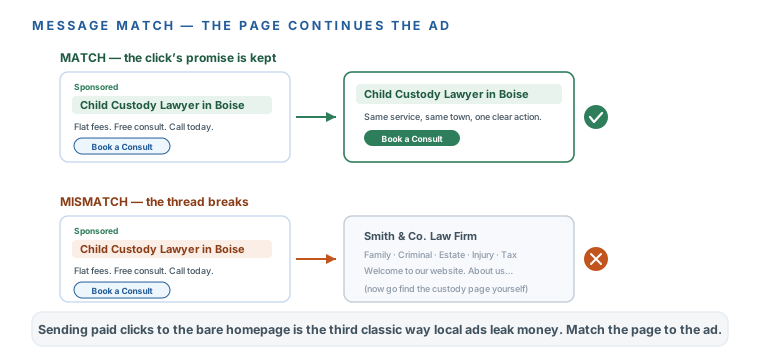
Someone clicked an ad that said “Child Custody Lawyer in [Town].” If they land on your generic homepage — law firm, seven practice areas, a stock photo of a courthouse — they have to hunt for the thing they came for, and most of them just leave. You paid for that click. This lesson makes the page keep the ad’s promise. One rule runs the whole thing: message match.
Message match: the page continues the ad
The person clicked a specific promise, so the page has to say the same specific thing, above the fold, with one obvious next step. Say custody, say [Town], offer one clear action. Sending paid clicks to the bare homepage is the third classic waste pattern of local Google Ads — right behind no negatives and the location default you already fixed. It’s not that the homepage is bad; it’s that it answers ten questions when the searcher has exactly one.
What the page must contain
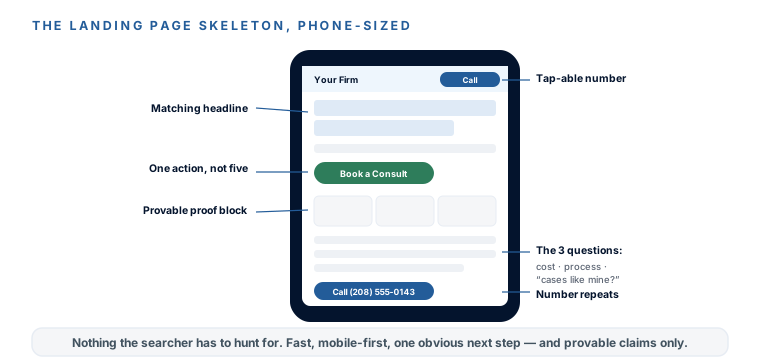
- The service + town in the headline, matching the ad group’s theme (“Child Custody Lawyer in [Town]”).
- Your phone number, tap-able, top-right and repeated down the page — call assets don’t always show, so the page must carry the number.
- One action, not five — one short form or one booking link. Every extra choice lowers the odds they take any.
- Two or three proof elements you can substantiate — years in practice, review count, a flat-fee promise. The state-bar red lines apply to pages exactly as they do to ads.
- Answers to the three questions every prospect has — roughly: what does it cost, how does it work, and “do you handle cases like mine.”
- Fast and mobile-first — most of these clicks are phones, and a slow page loses them before it loads. Not sure how yours does? Paste your URL into Google’s free PageSpeed Insights — if it scores badly on mobile, that’s a fix to make before you spend, not after.
The three tiers — best, fine, and never
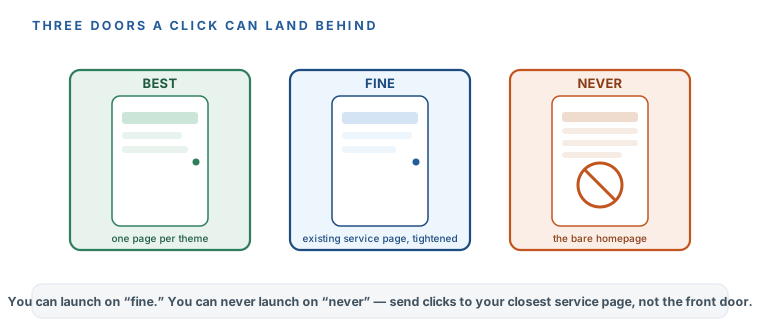
You don’t need a perfect page to launch. You need to not send clicks to the homepage. Here’s the honest hierarchy:
- Best: one page per ad-group theme — two or three pages total — each one continuing its ad’s exact promise. The prompt below drafts each in minutes.
- Fine: your existing service page for that theme, tightened with the prompt so the headline and first screen match the ad. Perfectly launchable.
- Never: the bare homepage. If the only page you have today is the homepage, send clicks to your closest existing service page instead — anything with the service named beats the front door.
Best
- One page per ad-group theme (2–3 total)
- Each continuing its ad's exact promise
- The prompt below drafts each in minutes
Fine
- Your existing service page for that theme
- Tightened so the first screen matches the ad
- Perfectly launchable
Never
- The bare homepage
- Send to your closest service page instead
- Anything with the service named beats the front door
Drafting the copy is a prompt; building and publishing the page is a different skill, and it belongs to Build a Stunning Website with AI and Edit & Update Your Website with AI. This lesson specifies what the page must say; those courses (or one prompt to Claude with your site’s platform named) handle how to get it live. Draft the copy here, publish it there.
Landing-page copy — one page per ad-group theme, under 450 words
Write the copy for a landing page that my Google ad sends clicks to. The ad promises one
specific thing and this page must continue it exactly.
- Business: [NAME], [what you do] in [TOWN].
- The ad group's theme and sample headline: [e.g. "child custody — 'Child Custody Lawyer in
  Boise'"]
- True, provable things about my firm: [same list you used for the ads]
- The ONE action I want a visitor to take: [call / book a consult / fill the short form]
- The 3 questions prospects always ask me: [e.g. "what does it cost", "how long does it
  take", "will I have to go to court"]

Write, in plain language a stressed person on a phone can skim:
1. A headline with the service + town, matching the ad's promise.
2. A one-sentence subhead that says who this is for and the one action.
3. A short "how it works" in 3 steps.
4. Honest answers to my 3 questions (2–3 sentences each — no dodging, no hype).
5. A proof block using only my provable facts.
6. The call-to-action line, repeated once mid-page and once at the end.
Rules: no superlatives I can't prove, no outcome promises, no invented facts (my state bar
reads ads AND pages). Keep the whole thing under 450 words.
One more time, because it’s the compliance line that catches firms off guard: your state bar’s advertising rules apply to your landing pages exactly as they apply to your ads. No unprovable superlatives, no outcome promises, no guarantees, and any required disclaimers belong here as well. If a claim can’t appear in the ad, it can’t appear on the page the ad points to.
Once each page is live, paste its URL into the matching ad group in your still-paused campaign. Every ad group now points at a page that keeps its promise.
DownloadEvery ad group’s clicks now land on a page that continues the ad’s exact promise — message match, not the bare homepage. You know what the page must contain (matching headline, a tap-able number that repeats, one action, a provable proof block, honest answers to the three questions, fast on mobile), and you know the three tiers: best is a page per theme, fine is a tightened existing page, never is the homepage. You drafted the copy with the prompt, kept it inside the state-bar red lines that apply to pages as much as ads, and pointed the mechanics at the website courses. Final URLs are pasted into the paused campaign. Next: the one checklist that ties everything from the last four modules together, and the button that turns it all on.