
Module 2 · Local Services Ads: pay per lead, not per click
Set up your LSA profile, end to end
Now you build the profile. This is the hands-on lesson: you’ll walk the real Local Services Ads signup from the eligibility check to a submitted profile — business details, the service types you offer, your service area, your hours, your photos, a budget placeholder. Most of it is straightforward. But two of these steps quietly decide how much money leaks out of your account every month, and I’m going to slow down on both. The walkthrough video for this lesson shows the exact click-path; one heads-up on it below.
The video that shows this build on screen still says “Google Screened” and “Google Guaranteed” in a few places — it was recorded before the rename. Ignore the old names; the badge is now Google Verified, and the actual signup flow it walks you through is current and correct. Watch the clicks, not the labels.
The build, step by step
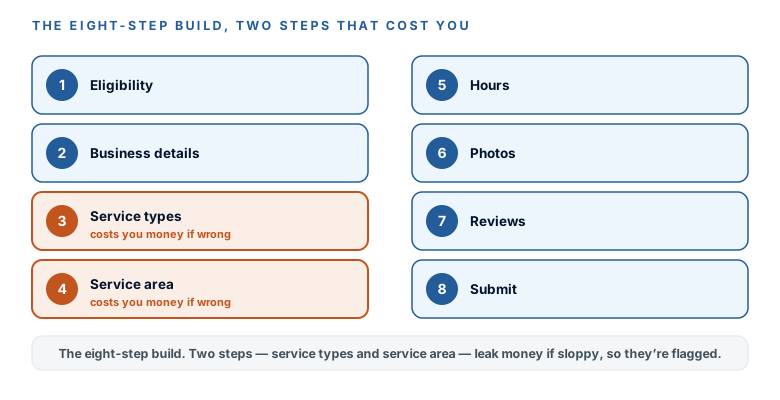
Have your documents from the last lesson within reach, open the signup, and go in this order. Each step mirrors what the walkthrough shows on screen.
- Start at the source and check eligibility. Go to ads.google.com/local-services-ads and let it check your category against your zip code. This is the honest availability test from the last lesson — what Google offers you here is the real answer, not what a blog promised.
- Enter business details that match your Google Business Profile exactly. Same name, same address, same phone number, character for character. Mismatches between your LSA profile and your Business Profile stall verification — Google is cross-checking them, and “Main St” vs “Main Street” is enough to slow you down.
- Select your service types — honestly. Check only what you genuinely offer. This is money step number one, and I’ll explain why below, but the rule is simple: every service type you check is a search you can be charged a lead for.
- Set your service area by zip or county. Same logic exactly — money step number two. List the areas you actually serve, and no others, because leads from areas you don’t serve are no longer creditable.
- Set your hours to when someone actually answers the phone. Not your aspirational hours — the hours a human picks up. Responsiveness is a ranking factor, and a profile that rings into voicemail sinks its own rank. If nobody answers at 8pm, don’t say you’re open at 8pm.
- Add real photos. Actual headshots, your office, your team. Profile quality — and photos are specifically named as part of it — is a ranking input. Stock photos of a generic handshake help nobody.
- Connect your reviews. Your Google Business Profile reviews attach to the LSA listing automatically. If you’re thin, the fix is the Get Found First review engine, not fake urgency or bought reviews — which can cost you the badge.
- Set a budget placeholder and submit for verification. Put a reasonable weekly number in for now; the next lesson sets bidding and budget properly. Then submit, and the 3–4-week clock from the last lesson starts.
Why “check everything” is the expensive mistake
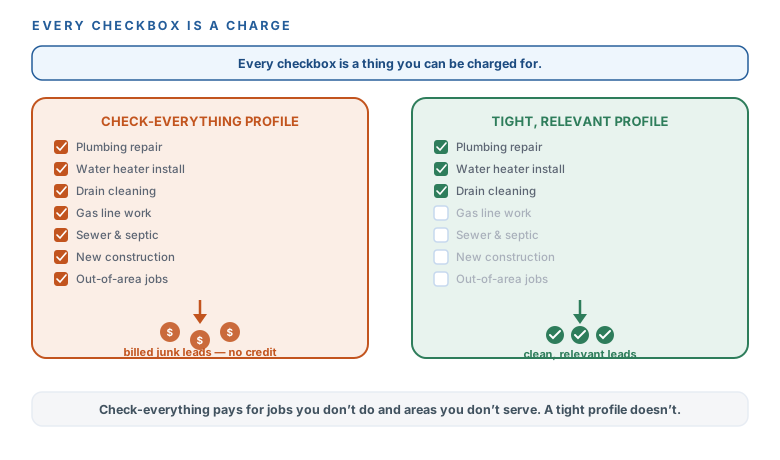
Here’s the instinct to fight: when you see a list of service-type checkboxes, it feels smart to check them all — more boxes, more leads, right? Wrong, and it’s wrong in a way that changed recently. Google charges you per lead, and it used to be that if you got a call for a job type or an area you don’t serve, you could dispute it and get credited. That’s gone. “Wrong job type” and “wrong area” leads are no longer creditable. So every service type you check that you don’t truly offer, and every zip you list that you don’t truly serve, is now a real bill you can’t claw back — a stranger calling about something you don’t do, you paying for the privilege, and no recourse.
The next lesson goes deep on the billing and the credit reality. For now, just carry the rule into steps three and four: check only what you do, list only where you serve. A tight profile that gets ten real leads beats a bloated one that gets ten real leads and five billed junk calls.
Check everything
- Every service-type box ticked
- Zips you don't truly serve, listed
- Billed for “wrong job type” and “wrong area” calls
- No credit anymore — you eat the bill
A tight profile
- Only the services you genuinely offer
- Only the areas you actually serve
- Every lead is relevant and workable
- Every checkbox is a thing you can be charged for
Let AI write the profile copy — and pick your checkboxes
Your profile needs a short bio and a clear picture of what you offer, and this is exactly the kind of careful, waste-averse thinking AI is good at. Give it your real facts — no invented credentials, no superlatives your bar would frown on — and let it draft the bio, tell you which boxes to leaveunchecked, and sanity-check your service area against where your clients actually come from.
Copy this prompt — LSA profile bio + service picks
Help me fill in my Local Services Ads profile so it reads like a real, trustworthy local firm.
- Business: [NAME], [what you do] in [TOWN/AREA].
- Years in business / credentials: [...]
- The services I actually offer (be exhaustive; I'll check only these): [LIST]
- What genuinely makes me different (1–2 real things): [...]

1. Write a short business bio (2–3 plain sentences, warm, no hype, no superlatives I can't prove — my state bar frowns on "best").
2. From my service list, tell me which LSA service-type checkboxes to check and which to LEAVE UNCHECKED — anything I don't truly offer costs me money, because Google charges per lead and no longer credits "wrong job type" leads.
3. Suggest the service area (zips/towns) that matches where my clients actually come from, and flag anywhere I listed that I probably shouldn't serve.
No invented facts. Ask me for anything you're missing.
You’ve walked the real signup to a submitted profile: business details matching your Google Business Profile exactly, service types and service area kept honest and tight (because “wrong job type” and “wrong area” leads no longer earn you a credit), hours set to when a human actually answers, real photos in, reviews connected, and a budget placeholder holding the spot. AI drafted your bio and helped you decide which boxes to leave unchecked. The verification clock is running. Next: bidding modes and budget — exactly how the money moves, and how much can leave your card in a month.
Watch this step
A full-screen walkthrough of the real LSA portal — signup, industry/service selection (it covers the lawyer license-ID and headshot steps), and the background-check / verification step through Google's provider Evident. Heads up: it says "Google Screened/Guaranteed" in places — the badge is now Google Verified, but the flow it walks is current. It’s from an independent creator — credited below, so go give them a follow.
2026 Google Guaranteed Local Service Ads Masterclass | Full Google LSA Setup
More learning resources
Still want another angle? These are hand-picked and vetted to line up with this lesson — from creators and sites worth your time.