Module 3 · Your first Search campaign
Build the campaign, ad group by ad group
Now you assemble the actual campaign in the real interface — and you stop just short of writing the ads, which get their own lesson later. This is the structure agencies charge four figures to set up: one tight campaign, two or three themed ad groups from your build sheet, and a settings gauntlet where every choice is deliberately un-Google-default. You’ll save it paused at the end, because it doesn’t go live until the launch checklist a couple of modules from now. Let’s build.
The structure, plainly
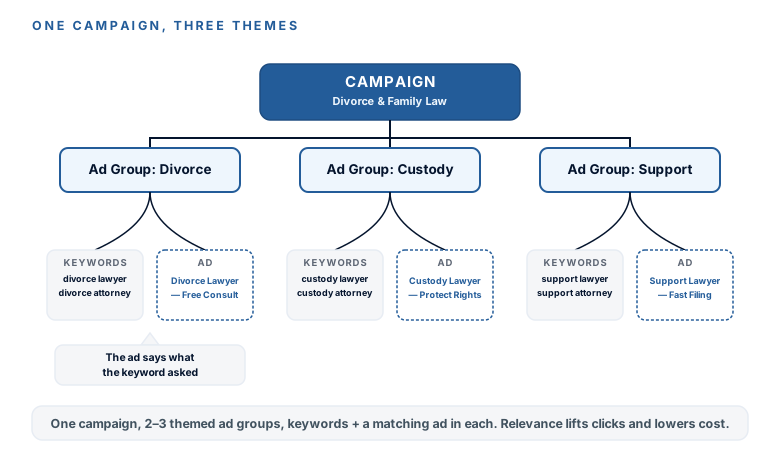
Three levels, and the logic is simple: one campaign (one budget, one geography) holds two or three ad groups (one per theme from your keyword lesson), and each ad group holds its keywords plus, eventually, its own ad. Why themes matter so much: someone who searched “child custody lawyer” should click an ad that says custody, not a generic firm ad. That relevance is both a click-through lever and a Quality Score lever — and Quality Score is, in plain terms, a price lever. Google charges relevant advertisers less. So a tight theme → matching ad → matching page isn’t just tidy; it’s cheaper.
1One campaignOne budget, one geography
2Two or three ad groupsOne per theme from your keyword lesson
3Keywords + a matching adThe ad says exactly what the keyword asked
The build, step by step
This mirrors the walkthrough videos. Move through it with your build sheet open.
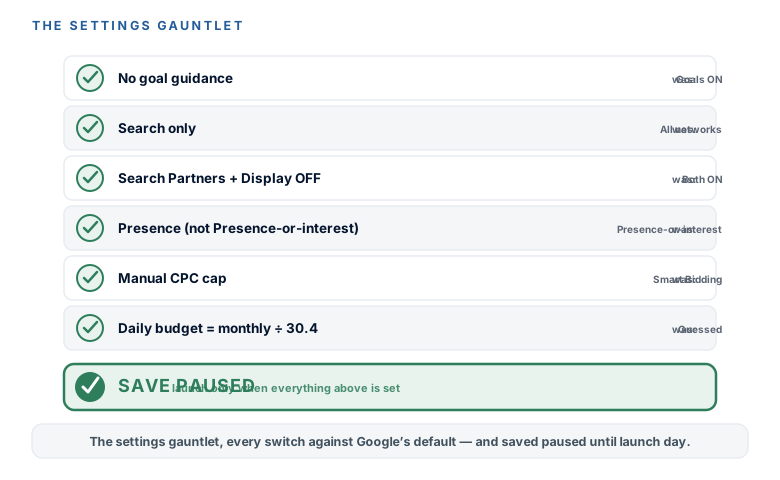
- New campaign → create without goal guidance. When Google asks you to pick a goal, choose to create a campaign without goal guidance. Picking a guided goal is another automation funnel; declining it keeps you in control of every setting.
- Campaign type: Search. Not Performance Max, not Display — plain Search. (A later module explains exactly when the fancier options earn a seat, and why not now.)
- Uncheck Search Partners and Display Network. Both are checked by default, and both are quiet budget leaks at this stage — they spread your spend onto other sites and networks you didn’t choose. Turn them off.
- Set your locations — and fix the Presence trap here. Enter your towns, then change the location option from Google’s default (“Presence or interest”) to “Presence” — people actually in or regularly in your area, not people who merely showed “interest.” The next module re-explains why this one setting matters so much; set it correctly now so you’re not leaking from day one.
- Bidding: start manual, with a max CPC cap. Choose manual CPC (or the “clicks” objective) and set a maximum cost-per-click cap from your worksheet. Smart Bidding needs conversion data you don’t have yet — a later module unlocks it once tracking is live. For now, you cap the click price yourself.
- Set the daily budget = monthly ÷ 30.4. Google budgets Search campaigns daily, so divide the monthly number from your plan by 30.4 to get the daily figure.
- Build each ad group. Name each one after its theme, and paste in that theme’s phrase and exact keywords from your build sheet. Two or three ad groups, that’s it.
- Skip the ads for now, and save PAUSED. Leave the ad creation as a placeholder — you’ll write proper responsive search ads in a later module. Save the campaign in the paused state. It stays paused until the launch checklist. Nothing spends until you say so.
The moment you save, Google’s Recommendations tab will light up with “improvements”: add broad match, raise your budget, expand your networks. You already turned auto-apply off back when you built the account, so none of it happens without your say-so — and a later module teaches you which of these nags are genuinely useful versus which just spend your money faster. For now, ignore the noise. Your campaign is built exactly the way you meant it.
Your first Search campaign is built and saved paused — the structure an agency charges four figures for, done yourself. One campaign, two or three themed ad groups from your build sheet, so the ad can say exactly what each keyword asked. And every setting is deliberately not the Google default: created without goal guidance, Search only, Search Partners and Display off, Presence location targeting, a manual CPC cap from your worksheet, and a daily budget of monthly ÷ 30.4. You skipped ad creation (that’s coming), you left it paused, and you know Google’s recommendation nags are just noise you already muted. The campaign skeleton is complete. Next module: waste-proofing it — the negative-keyword list, the Search Terms report, and the location and schedule hygiene that protect every dollar.
Would you rather someone run these for you?
Evolvv builds and runs end-to-end ad campaigns — Google Ads, Meta, the landing pages and follow-up behind them. Book a free strategy session and we can chat about your options. And if you’d rather keep the wheel, the rest of this course has you covered.
Watch this step
Two takes on the structure this lesson builds: a hands-on local build of three themed ad groups (service / near-me / location), plus the campaigns-vs-ad-groups "why" layer so the tree makes sense before you assemble it. It’s from an independent creator — credited below, so go give them a follow.
Full Google Ads Tutorial For Local Service Business (Learn In 1 Hour) 2026
The BEST Google Ads Campaign Structure for 2026