
Module 3 · Your first Search campaign
Keywords: find them free, group them tight
A keyword is you buying the exact words someone types at the moment they need you. That makes intent the entire game — not how many people search a phrase, but whether the person searching it is ready to hire. This lesson gets you a real keyword set for your one service: discovered free in Google’s Keyword Planner, then sorted and grouped by AI into two or three tight themes you’ll build on. It’s the work agencies used to bill a monthly retainer for, done in an evening.
Intent is the whole game
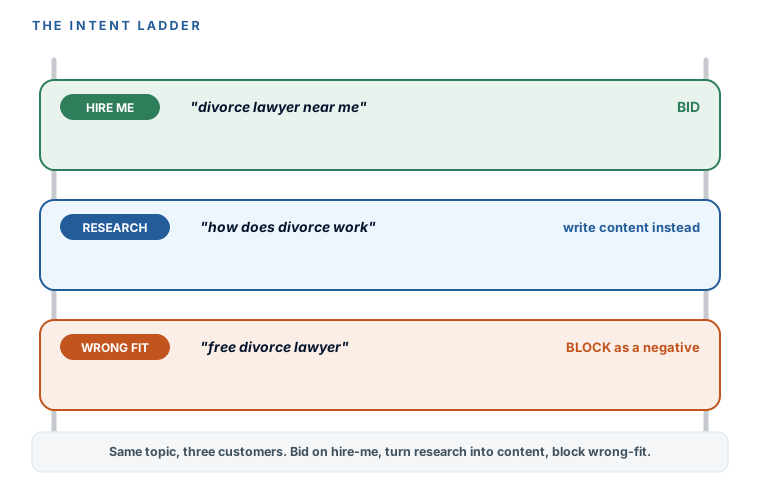
Three people type three phrases about divorce, and they are not the same customer. Read the intent, not the topic:
- “divorce lawyer near me” — hire-me intent. This person wants a lawyer today. Bid on this.
- “how does divorce work in [state]” — research intent. This person is learning, not hiring. Don’t pay for this click — it’s a blog post, not a lead. That’s content, and it’s exactly what our Create Content Your Audience Loves course teaches you to write instead.
- “free divorce lawyer” — wrong-fit intent. This person can’t or won’t pay. That’s a negative keyword — a search you actively block, which is the whole next module.
Keep this ladder in your head through the whole discovery process. You’re not collecting the most keywords; you’re collecting the ones a ready-to-hire person actually types.
| Intent | What they type | What you do |
|---|---|---|
| Hire me | “divorce lawyer near me” | Bid on it |
| Research | “how does divorce work in [state]” | Write content instead — don't pay for the click |
| Wrong fit | “free divorce lawyer” | Block it as a negative keyword |
Find keywords free in Keyword Planner
Google’s Keyword Planner is free and it’s all you need to start. One honest catch to know up front: on an account with little or no spend, it shows search volumes as ranges — “1K–10K” rather than an exact number. That’s completely fine for what you’re doing, because you’re comparing relative size and reading intent, not doing science. (Practitioners say exact numbers unlock once you’re spending actively, but Google publishes no threshold, so don’t chase it.) Here’s the workflow the walkthrough video mirrors:
- Open Keyword Planner. In Google Ads, go to Tools → Keyword Planner.
- Choose “Discover new keywords.” This is the discovery mode, not the forecast mode.
- Seed it with your service plus your town. For example, “divorce lawyer” and your city. Google returns a list of related searches.
- Read the list for two things: rough volume (ranges are fine — you’re comparing) and the top-of-page bid column, which is your reality check on what a click in your world actually costs. Write the low-range top-of-page bid for your main terms on your build sheet — that number becomes your manual CPC cap in the next lesson, so you’re not guessing it later.
- Copy or export the plausible ones — anything that reads like a ready-to-hire search. Don’t filter hard yet; the AI does the sorting next.
Let AI do the agency’s grouping work
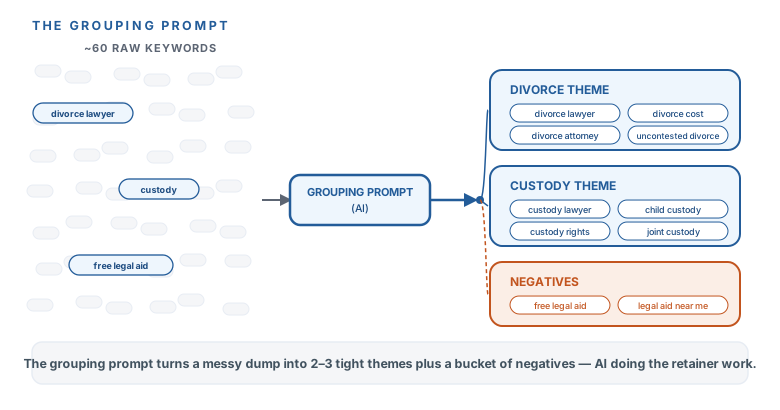
Now paste your raw list into the prompt below. It does exactly what a careful, waste-averse ads manager would do: keep only the hire-intent terms, tell you why it cut each of the rest, group the keepers into two or three tight themes with the same intent (each theme becomes one ad group with its own ad), format them for Google Ads in phrase and exact match, and hand you a starter pile of negatives to bank for the next module. Paste the prompt whole; the [BRACKETED] parts are what you swap in.
Copy this prompt — keyword grouping
I pulled a keyword list from Google Keyword Planner for my ad campaign. Sort it for me like a
careful, waste-averse ads manager would.
- My business: [WHAT YOU DO] in [TOWN].
- The ONE service this campaign advertises: [SERVICE].
- My raw keyword list (with volumes/bids where I have them):
[PASTE LIST]

1. Keep only keywords a person types when they're ready to HIRE someone like me (not research,
   not DIY, not jobs, not free help). Cut everything else and tell me why in one phrase each.
2. Group the keepers into 2–3 tight themes with the SAME intent (e.g. "divorce lawyer" terms vs
   "child custody lawyer" terms) — each theme becomes one ad group with its own ad.
3. Give me each theme's keywords formatted for Google Ads in phrase and exact match, like:
   "divorce lawyer [town]" and [divorce lawyer [town]].
4. From the cut pile, list anything I should proactively BLOCK as a negative keyword
   (free, jobs, DIY, definitions, other practice areas). I'll use this list in a later module.
Nothing broad match. Keep the total across all themes to 25 keywords or fewer.
Depth beats breadth — keep it to 25
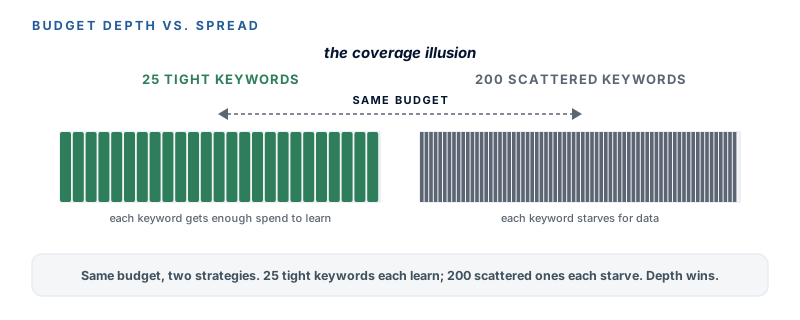
The guardrail for your first campaign: two or three ad groups, and roughly 15 to 25 keywords total. Not per theme — total. Beginners want to add 200 keywords because it feels like more coverage, but at this budget it’s the opposite: your money spreads so thin across so many terms that none of them gets enough data to mean anything, and the loose ones quietly bleed budget. A tight set of high-intent keywords, each getting real traffic, is how a small budget competes. Coverage is an illusion; depth is the strategy.
A question that comes up early: should you buy your own firm name as a keyword? At this budget, usually not — people typing your exact name already found you, so you’d mostly be paying for clicks you’d get free from the organic result right below. The one exception: if a competitor is bidding on your name and sitting above you, a cheap branded keyword buys back the top slot. Check by searching your own name incognito — if a rival’s ad is there, add it; if not, skip it and keep the budget on hire-intent terms.
You’ve got a real keyword set for your one service, and you understand the thing that makes it work: intent — bid on hire-me searches, turn research searches into content, block wrong-fit searches. You discovered the terms free in Keyword Planner (ranges and all), read the top-of-page bid as your cost reality check, and let AI sort them into two or three tight, same-intent themes formatted in phrase and exact, with a negatives pile banked for the next module. And you’re holding the line at 25 keywords or fewer, because depth beats breadth at your budget. It’s on your build sheet. Next: match types — why phrase and exact are your day-one default, and why broad match stays locked.
Watch this step
The free Keyword Planner path this lesson runs, with local-service seeds — and it handles the honest catch head-on: with little or no spend the tool shows volume ranges, not exact counts, which is all you need to compare relative size. It’s from an independent creator — credited below, so go give them a follow.
Google Keyword Planner Tutorial 2026
More learning resources
Still want another angle? These are hand-picked and vetted to line up with this lesson — from creators and sites worth your time.